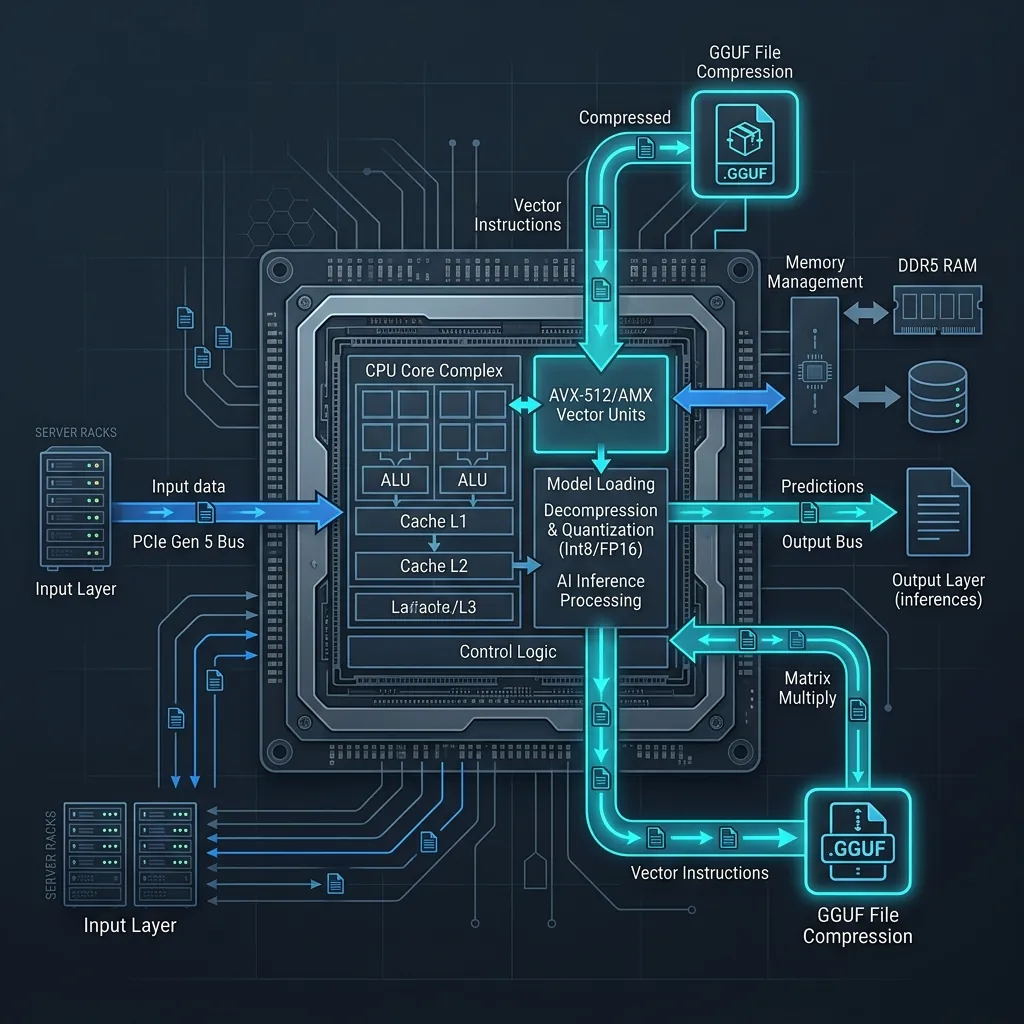
Running large language models (LLMs) has traditionally been synonymous with high-end, expensive GPUs. However, the open-source community has driven massive breakthroughs in model architectural efficiency and quantization techniques. In 2026, developers can serve highly capable, lightweight open-source LLMs locally on consumer-grade CPUs with sub-second time-to-first-token (TTFT) metrics.
This guide explores the engineering principles of CPU-based local LLM inference and demonstrates how to build and optimize an OpenAI-compatible FastAPI inference server using llama-cpp-python.
Understanding the Physics of CPU Inference
To run local LLMs on a CPU efficiently, developers must understand the hardware constraints. GPU inference is largely limited by parallel computation power (FLOPs), whereas CPU inference is almost entirely constrained by memory bandwidth.
GGUF & Quantization: The Compression Breakthrough
LLMs represent weights as floating-point numbers, traditionally in 16-bit float formats (FP16 or BF16). A 3-billion parameter model in FP16 format requires approximately 6 GB of memory just to load, and every single token generated requires reading those 6 GB from system RAM.
Quantization scales these weights down to lower bit-widths (e.g., 4-bit or 5-bit integers) using methods like RTN (Round-To-Nearest) or block-wise quantization. GGUF (GPT-Generated Unified Format) is the standard binary format designed for local CPU inference. It packages model weights, tokenizers, and metadata into a single file and allows structured splitting across memory and disk mapping (mmap).
Using a Q4_K_M (4-bit) quantization scheme:
- The model size drops by roughly 70-75% (a 3B model occupies ~1.9 GB of RAM).
- The memory bandwidth requirement drops proportionally, speeding up inference by 3x on CPU systems.
- Perplexity loss remains negligible compared to the original unquantized model.
Hardware Vectorization: AVX-512 & Apple Silicon AMX
Modern CPUs leverage SIMD (Single Instruction, Multiple Data) processing to compute matrix multiplications in parallel:
- Intel/AMD x86: AVX2 and AVX-512 (Advanced Vector Extensions) allow the CPU to perform multiple mathematical calculations inside a single instruction cycle. AVX-512 is crucial for processing the matrix multiplication routines of quantized weights.
- Apple Silicon: Apple M-series chips feature an Advanced Matrix Coprocessor (AMX) engine, which operates independently of the CPU cores to speed up local neural network operations.
Selection of Lightweight Open-Source Models
When serving models strictly on CPU hardware, targeting the 1B to 4B parameter range yields the best balance between execution speed and task capability. The leading lightweight models include:
- Phi-4-mini (3.8B): Released under a permissive MIT license, Microsoft’s Phi-4-mini is optimized for logical reasoning, programming, and mathematical calculations. It supports a 128K context window and handles complex instruction-following tasks.
- SmolLM3 (3B): Hugging Face’s lightweight model family designed for high-efficiency and multilingual execution. It is highly optimized for resource-constrained systems, performing exceptionally well with 8GB RAM setups.
- Qwen Series (0.5B to 3B): Alibaba’s Qwen family is widely known for multilingual tasks and coding assistance. The smaller variants are highly compact, rendering them ideal for low-spec servers or local helper agents.
- Gemma 2 (2B): Google’s lightweight model optimized for on-device performance. It is extremely compact and excels at structured extraction and chat conversation.
Designing the CPU-Optimized Serving Stack
To serve local models programmatically, we will build a microservice wrapping llama.cpp using Python bindings (llama-cpp-python) and FastAPI.
Hardware Compilation Setup
Before running the server, ensure llama-cpp-python is compiled with CPU-specific hardware acceleration enabled.
For x86 CPUs with AVX-512 support:
# Enable AVX2 and AVX-512 compiler flags
CMAKE_ARGS="-DGGML_AVX512=ON -DGGML_AVX2=ON" pip install llama-cpp-python --force-reinstall --no-cache-dir
For Apple Silicon (M1/M2/M3/M4):
# Enable Metal API acceleration for Apple Unified Memory
CMAKE_ARGS="-DGGML_METAL=ON" pip install llama-cpp-python --force-reinstall --no-cache-dir
Implementation: FastAPI Local Server
Below is a complete, production-ready asynchronous Python microservice that exposes an OpenAI-compatible /v1/chat/completions endpoint for locally served GGUF models.
import os
import multiprocessing
from typing import List, Dict, Any, Optional
from pydantic import BaseModel, Field
from fastapi import FastAPI, HTTPException
from fastapi.middleware.cors import CORSMiddleware
from llama_cpp import Llama

# ----------------------------------------------------
# 1. Configuration & Constants
# ----------------------------------------------------
MODEL_PATH = os.getenv("LOCAL_MODEL_PATH", "./models/phi-4-mini-instruct.Q4_K_M.gguf")
CONTEXT_WINDOW = int(os.getenv("MODEL_CONTEXT_WINDOW", "4096"))

# Optimize CPU Threads:
# Using physical cores instead of logical hyperthreaded cores yields the best inference speed.
PHYSICAL_CORES = multiprocessing.cpu_count() // 2
THREADS = int(os.getenv("CPU_THREADS", str(max(1, PHYSICAL_CORES))))

# ----------------------------------------------------
# 2. Local Model Initialization
# ----------------------------------------------------
if not os.path.exists(MODEL_PATH):
    raise FileNotFoundError(
        f"Model file not found at {MODEL_PATH}. "
        "Please download the GGUF model and update the configuration."
    )

print(f"Loading local model from: {MODEL_PATH}")
print(f"Allocated CPU Threads: {THREADS} (Context Window: {CONTEXT_WINDOW})")

llm = Llama(
    model_path=MODEL_PATH,
    n_ctx=CONTEXT_WINDOW,      # Context window size
    n_threads=THREADS,         # Physical CPU threads
    n_batch=512,               # Batch size for prompt processing
    use_mmap=True,             # Map model directly into virtual memory
    use_mlock=False            # Lock model in RAM (set True to prevent swap if RAM is abundant)
)

# ----------------------------------------------------
# 3. Request and Response Schemas (OpenAI-Compatible)
# ----------------------------------------------------
class ChatMessage(BaseModel):
    role: str = Field(..., description="Role of the sender: system, user, or assistant")
    content: str = Field(..., description="Message text content")

class ChatCompletionRequest(BaseModel):
    messages: List[ChatMessage] = Field(..., min_items=1)
    temperature: float = Field(0.7, ge=0.0, le=2.0)
    top_p: float = Field(0.9, ge=0.0, le=1.0)
    max_tokens: int = Field(512, ge=1)
    stream: bool = Field(False)

class ChatCompletionChoice(BaseModel):
    index: int
    message: ChatMessage
    finish_reason: str

class ChatCompletionResponse(BaseModel):
    id: str
    object: str = "chat.completion"
    created: int
    model: str
    choices: List[ChatCompletionChoice]
    usage: Dict[str, int]

# ----------------------------------------------------
# 4. FastAPI Application Setup
# ----------------------------------------------------
app = FastAPI(
    title="Local CPU Inference Server",
    description="Optimized local microservice for lightweight open-source LLMs on CPU.",
    version="1.0.0"
)

app.add_middleware(
    CORSMiddleware,
    allow_origins=["*"],
    allow_credentials=True,
    allow_methods=["*"],
    allow_headers=["*"],
)

@app.post("/v1/chat/completions", response_model=ChatCompletionResponse)
async def create_chat_completion(request: ChatCompletionRequest):
    try:
        # Convert Pydantic models to list of dicts for llama.cpp wrapper
        formatted_messages = [msg.model_dump() for msg in request.messages]

        # Run local CPU inference synchronously (handles batching internally)
        output = llm.create_chat_completion(
            messages=formatted_messages,
            temperature=request.temperature,
            top_p=request.top_p,
            max_tokens=request.max_tokens,
            stream=False  # Simulating non-streaming endpoint
        )

        # Standardize output format
        choice = output["choices"][0]
        return ChatCompletionResponse(
            id=output["id"],
            created=output["created"],
            model=output["model"],
            choices=[
                ChatCompletionChoice(
                    index=0,
                    message=ChatMessage(
                        role=choice["message"]["role"],
                        content=choice["message"]["content"]
                    ),
                    finish_reason=choice["finish_reason"] or "stop"
                )
            ],
            usage=output["usage"]
        )

    except Exception as e:
        raise HTTPException(status_code=500, detail=str(e))

@app.get("/health")
async def health_check():
    return {"status": "healthy", "model": os.path.basename(MODEL_PATH)}
CPU Serving Best Practices & Optimizations
To maximize the performance of your local CPU server, configure these system-level parameters:
1. Match Threads to Physical Cores
A common mistake is assigning the maximum number of logical processors (including hyperthreaded cores) to the thread count parameter. Hyperthreading shares physical computational units, which creates instruction pipelines bottlenecks during massive matrix multiplications.
- Rule of thumb: Set
n_threadsequal to the number of physical cores on your CPU. E.g., on a CPU with 8 physical cores and 16 logical threads, usen_threads=8.
2. Enable Memory Mapping (use_mmap=True)
Memory mapping permits llama.cpp to map the GGUF file directly into your virtual memory address space. The system reads the weights directly from the filesystem disk cache.
- This dramatically reduces initialization time (the model loads in milliseconds instead of seconds).
- If other processes request RAM, the OS can safely reclaim inactive pages without writing to disk.
3. Avoid Swap Space Penalties
If your physical RAM limit is exceeded, the OS starts moving model weights to virtual memory swap space on the SSD/HDD. This degrades token generation speed from ~25 tokens per second to less than 1 token per second.
- Always leave at least 2 GB of head room when choosing a model size.
- If you have dedicated resources, set
use_mlock=Trueto lock the model weights in active RAM, preventing page outs.
4. Implement Prompt Caching
llama.cpp supports caching evaluated prompt prefixes. If multiple requests share the same system instructions or historical chat contexts, the engine avoids recalculating the key-value (KV) states for those tokens.
- Set the context caching parameters to speed up generation when running local agents or multi-turn chat applications.
Conclusion
Running local open-source LLMs on a CPU is a highly viable path for offline workflows, developer tooling, and cost-controlled deployments. By utilizing GGUF format quantization, compiling with vector instruction acceleration (AVX-512/AMX), and adhering to physical core threading configurations, you can run models like Phi-4-mini or SmolLM3 with high speed and zero cloud API dependency.
Get Weekly AI Architect Cost & Strategy Updates
Join 14,000+ developers receiving weekly, data-driven cost-reduction blueprints and production-ready agent guidelines.