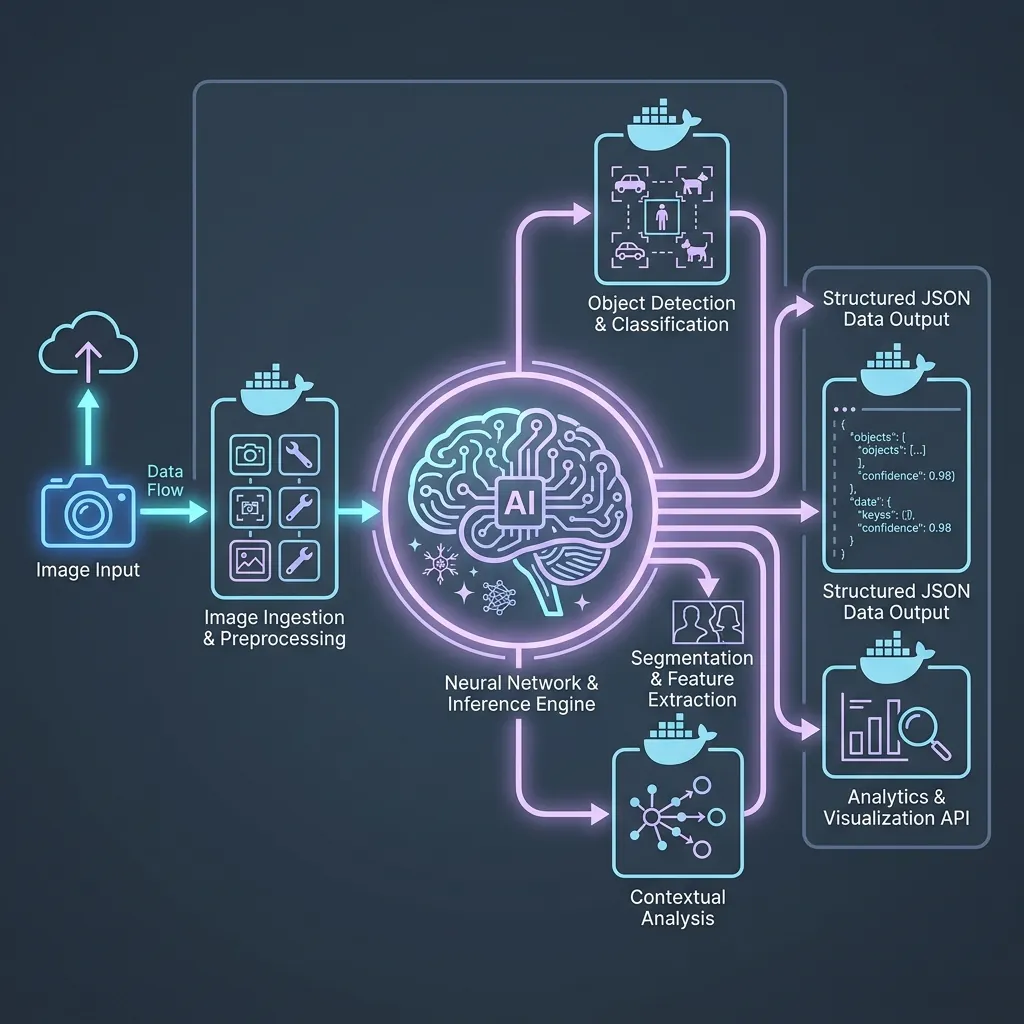
Building AI applications that understand images is one of the most commercially valuable capabilities available to developers today. Document parsing, product cataloging, medical imaging triage, and security monitoring all rely on vision-language models (VLMs) to extract structured data from visual inputs.
However, taking a vision AI prototype from a Jupyter notebook to a production-grade, containerized microservice requires careful engineering across multiple layers: structured data validation, asynchronous web serving, reproducible dependency management, and container orchestration.
This guide walks through every layer of that stack. We will build a complete multimodal vision analysis service using Pydantic AI for structured agent orchestration, FastAPI for the async web layer, uv for lightning-fast dependency management, and Docker with Docker Compose for reproducible deployment.
Understanding the Technology Stack
Before writing code, let us clarify why each tool is essential and what role it plays in the architecture.
Pydantic AI
Pydantic AI is a Python agent framework built by the creators of Pydantic. It provides a clean, type-safe interface for interacting with LLMs. Its key advantage for vision applications is structured output extraction. You define a Pydantic model (e.g., InvoiceData or ProductLabel) and Pydantic AI forces the LLM to return data that strictly conforms to that schema. This eliminates the fragile regex parsing and JSON-fixing that plagues traditional LLM integrations.
For multimodal inputs, Pydantic AI provides two primitives:
ImageUrl: Pass a publicly accessible image URL directly to the agent.BinaryContent: Pass raw image bytes (e.g., from a file upload) with a specified MIME type.
FastAPI
FastAPI is the standard Python framework for building high-performance asynchronous APIs. It natively integrates with Pydantic for request/response validation and generates interactive OpenAPI documentation automatically.
uv
uv is a Rust-based Python package manager that replaces pip, pip-tools, and virtualenv. It resolves and installs dependencies 10-100x faster than pip and produces a deterministic uv.lock file that guarantees identical environments across development, CI/CD, and production containers.
Docker and Docker Compose
Docker packages the application and all its dependencies into an isolated, portable container. Docker Compose orchestrates multiple containers (e.g., the API service and a Redis cache) with a single configuration file.
Step 1: Bootstrapping the Project with uv
Initialize a new Python project using uv. This creates the pyproject.toml manifest and pins the Python version.
# Create the project directory
mkdir vision-ai-service && cd vision-ai-service

# Initialize the project with uv
uv init .

# Pin the Python version
uv python pin 3.13

# Add production dependencies
uv add pydantic-ai fastapi uvicorn python-multipart httpx

# Add development dependencies
uv add --dev pytest ruff
After running these commands, your project will have the following structure:
vision-ai-service/
  .python-version
  pyproject.toml
  uv.lock
  main.py
The pyproject.toml file will contain all your dependencies, and uv.lock will contain the exact pinned versions for reproducible builds.
Step 2: Defining Structured Vision Schemas
The core advantage of Pydantic AI is forcing the LLM to return data that conforms to a strict schema. Let us define schemas for two common vision use cases: product label analysis and document/invoice extraction.
Create a file app/schemas.py:
from pydantic import BaseModel, Field
from typing import List, Optional
from enum import Enum


class Confidence(str, Enum):
    HIGH = "high"
    MEDIUM = "medium"
    LOW = "low"


class ExtractedEntity(BaseModel):
    """A single named entity extracted from the image."""
    label: str = Field(..., description="The category of the entity (e.g., 'product_name', 'price', 'date')")
    value: str = Field(..., description="The extracted text value")
    confidence: Confidence = Field(..., description="Confidence level of the extraction")


class ProductLabelAnalysis(BaseModel):
    """Structured output for analyzing a product label or packaging image."""
    product_name: str = Field(..., description="The primary product name visible on the label")
    brand: Optional[str] = Field(None, description="The brand or manufacturer name")
    ingredients: List[str] = Field(default_factory=list, description="List of ingredients if visible")
    nutritional_claims: List[str] = Field(default_factory=list, description="Health or nutritional claims (e.g., 'organic', 'gluten-free')")
    weight_or_volume: Optional[str] = Field(None, description="Net weight or volume as printed")
    barcode_detected: bool = Field(False, description="Whether a barcode or QR code is visible")


class InvoiceExtraction(BaseModel):
    """Structured output for extracting data from an invoice or receipt image."""
    vendor_name: str = Field(..., description="The name of the vendor or company issuing the invoice")
    invoice_number: Optional[str] = Field(None, description="Invoice or receipt number")
    date: Optional[str] = Field(None, description="Date of the invoice in YYYY-MM-DD format")
    total_amount: Optional[str] = Field(None, description="Total amount including currency symbol")
    tax_amount: Optional[str] = Field(None, description="Tax amount if listed separately")
    line_items: List[ExtractedEntity] = Field(default_factory=list, description="Individual line items extracted")
    payment_method: Optional[str] = Field(None, description="Payment method if visible (e.g., 'Visa', 'Cash')")
These schemas guarantee that no matter how the LLM phrases its internal reasoning, the final output will always conform to strict field types, required values, and enumerated confidence levels.
Step 3: Building the Pydantic AI Vision Agent
Now we build the core agent layer. Pydantic AI agents accept multimodal inputs (BinaryContent for uploaded files) and return structured outputs (result_type).
Create a file app/agent.py:
from pydantic_ai import Agent, BinaryContent
from app.schemas import ProductLabelAnalysis, InvoiceExtraction


# Agent for Product Label Analysis
product_agent = Agent(
    model="google-gla:gemini-2.0-flash",
    result_type=ProductLabelAnalysis,
    system_prompt=(
        "You are a product label analysis specialist. "
        "Examine the provided image of a product label or packaging. "
        "Extract all visible information including the product name, brand, "
        "ingredients list, nutritional claims, weight/volume, and barcode presence. "
        "Be precise. Only extract information that is clearly visible in the image."
    ),
)


# Agent for Invoice/Receipt Extraction
invoice_agent = Agent(
    model="google-gla:gemini-2.0-flash",
    result_type=InvoiceExtraction,
    system_prompt=(
        "You are a financial document extraction specialist. "
        "Examine the provided image of an invoice, receipt, or bill. "
        "Extract the vendor name, invoice number, date, total amount, tax, "
        "individual line items, and payment method. "
        "Format dates as YYYY-MM-DD. Include currency symbols with amounts."
    ),
)


async def analyze_product_label(image_bytes: bytes, media_type: str) -> ProductLabelAnalysis:
    """Run the product label agent on the provided image bytes."""
    result = await product_agent.run(
        [
            "Analyze this product label image and extract all structured information.",
            BinaryContent(data=image_bytes, media_type=media_type),
        ]
    )
    return result.output


async def extract_invoice_data(image_bytes: bytes, media_type: str) -> InvoiceExtraction:
    """Run the invoice extraction agent on the provided image bytes."""
    result = await invoice_agent.run(
        [
            "Extract all structured data from this invoice or receipt image.",
            BinaryContent(data=image_bytes, media_type=media_type),
        ]
    )
    return result.output
Notice how the agent definition is clean and declarative. The result_type parameter tells Pydantic AI to enforce schema validation on the LLM output. If the model returns malformed data, Pydantic AI automatically retries the request with corrective instructions.
Step 4: Building the FastAPI Web Layer
Now we wire everything together with FastAPI endpoints that accept image uploads and return structured JSON responses.
Create the main application file app/main.py:
import os
from contextlib import asynccontextmanager
from fastapi import FastAPI, HTTPException, UploadFile, File
from fastapi.middleware.cors import CORSMiddleware
from app.agent import analyze_product_label, extract_invoice_data
from app.schemas import ProductLabelAnalysis, InvoiceExtraction


ALLOWED_MIME_TYPES = {"image/jpeg", "image/png", "image/webp", "image/gif"}


@asynccontextmanager
async def lifespan(app: FastAPI):
    """Application lifespan: validate API key on startup."""
    api_key = os.getenv("GEMINI_API_KEY")
    if not api_key:
        raise RuntimeError(
            "GEMINI_API_KEY environment variable is not set. "
            "Please configure it before starting the service."
        )
    print("Vision AI Service started successfully.")
    yield
    print("Vision AI Service shutting down.")


app = FastAPI(
    title="Vision AI Extraction Service",
    description="Production multimodal vision API powered by Pydantic AI and Gemini.",
    version="1.0.0",
    lifespan=lifespan,
)

app.add_middleware(
    CORSMiddleware,
    allow_origins=["*"],
    allow_credentials=True,
    allow_methods=["*"],
    allow_headers=["*"],
)


def validate_upload(file: UploadFile) -> None:
    """Validate that the uploaded file is a supported image type."""
    if file.content_type not in ALLOWED_MIME_TYPES:
        raise HTTPException(
            status_code=400,
            detail=f"Unsupported file type: {file.content_type}. "
                   f"Supported types: {list(ALLOWED_MIME_TYPES)}"
        )


@app.post("/api/v1/analyze/product", response_model=ProductLabelAnalysis)
async def analyze_product(file: UploadFile = File(...)):
    """
    Upload a product label or packaging image.
    Returns structured extraction of product name, brand,
    ingredients, nutritional claims, and barcode detection.
    """
    validate_upload(file)
    try:
        image_bytes = await file.read()
        result = await analyze_product_label(image_bytes, file.content_type)
        return result
    except Exception as e:
        raise HTTPException(status_code=500, detail=str(e))


@app.post("/api/v1/analyze/invoice", response_model=InvoiceExtraction)
async def analyze_invoice(file: UploadFile = File(...)):
    """
    Upload an invoice, receipt, or bill image.
    Returns structured extraction of vendor, amounts,
    line items, dates, and payment method.
    """
    validate_upload(file)
    try:
        image_bytes = await file.read()
        result = await extract_invoice_data(image_bytes, file.content_type)
        return result
    except Exception as e:
        raise HTTPException(status_code=500, detail=str(e))


@app.get("/health")
async def health_check():
    return {"status": "healthy", "service": "vision-ai-extraction"}
Step 5: Containerizing with Docker Multi-Stage Builds
A multi-stage Dockerfile ensures that build tools (like uv and compilers) never make it into the final production image, keeping it small and secure.
Create a Dockerfile in the project root:
# ============================================
# Stage 1: Builder
# ============================================
FROM python:3.13-slim AS builder

# Install uv from the official container image
COPY --from=ghcr.io/astral-sh/uv:latest /uv /bin/uv

# Configure uv environment
ENV VIRTUAL_ENV=/opt/venv
ENV UV_COMPILE_BYTECODE=1
ENV UV_LINK_MODE=copy

# Create virtual environment
RUN uv venv $VIRTUAL_ENV
ENV PATH="$VIRTUAL_ENV/bin:$PATH"

# Copy dependency files first (layer caching optimization)
WORKDIR /build
COPY pyproject.toml uv.lock ./

# Install dependencies using frozen lockfile for reproducibility
RUN --mount=type=cache,target=/root/.cache/uv \
    uv sync --frozen --no-dev --no-install-project

# Copy the rest of the application code
COPY . .

# Install the project itself
RUN --mount=type=cache,target=/root/.cache/uv \
    uv sync --frozen --no-dev

# ============================================
# Stage 2: Production Runtime
# ============================================
FROM python:3.13-slim

# Copy the virtual environment from the builder stage
COPY --from=builder /opt/venv /opt/venv
ENV PATH="/opt/venv/bin:$PATH"

# Set up the application directory
WORKDIR /app
COPY . /app

# Create a non-root user for security
RUN useradd --create-home --shell /bin/bash appuser
USER appuser

# Expose the FastAPI port
EXPOSE 8000

# Start the FastAPI server with uvicorn
CMD ["uvicorn", "app.main:app", "--host", "0.0.0.0", "--port", "8000", "--workers", "2"]
Why This Structure Matters
- Layer caching:
pyproject.tomlanduv.lockare copied before the source code. If your code changes but dependencies do not, Docker reuses the cached dependency layer, saving minutes on every rebuild. --frozenflag: Guarantees thatuv syncuses exactly the versions inuv.lockwithout attempting to resolve new versions.UV_COMPILE_BYTECODE=1: Pre-compiles all.pyfiles to.pycbytecode during the build. This eliminates the compilation overhead on first import in production, reducing cold-start latency.- Non-root user: The final image runs as
appuser, notroot, following container security best practices.
Step 6: Orchestrating with Docker Compose
Docker Compose simplifies running the service alongside supporting infrastructure. Create a docker-compose.yml file:
services:
  vision-api:
    build:
      context: .
      dockerfile: Dockerfile
    container_name: vision-ai-service
    ports:
      - "8000:8000"
    environment:
      - GEMINI_API_KEY=${GEMINI_API_KEY}
    env_file:
      - .env
    restart: unless-stopped
    healthcheck:
      test: ["CMD", "curl", "-f", "http://localhost:8000/health"]
      interval: 30s
      timeout: 10s
      retries: 3
      start_period: 15s
    deploy:
      resources:
        limits:
          memory: 512M
          cpus: "1.0"
Create a .env file to store your API key securely (add .env to your .gitignore):
GEMINI_API_KEY=your-api-key-here
Running the Service
# Build and start the service
docker compose up --build -d

# View logs
docker compose logs -f vision-api

# Stop the service
docker compose down
Step 7: Testing the API
Once the service is running, you can test it using curl or any HTTP client.
Test Product Label Analysis
curl -X POST http://localhost:8000/api/v1/analyze/product \
  -F "file=@./sample_product_label.jpg" \
  | python -m json.tool
Example Response:
{
  "product_name": "Organic Greek Yogurt",
  "brand": "Chobani",
  "ingredients": ["Cultured Pasteurized Nonfat Milk", "Live Active Cultures"],
  "nutritional_claims": ["Non-GMO", "No Artificial Flavors", "Gluten-Free"],
  "weight_or_volume": "5.3 oz (150g)",
  "barcode_detected": true
}
Test Invoice Extraction
curl -X POST http://localhost:8000/api/v1/analyze/invoice \
  -F "file=@./sample_invoice.png" \
  | python -m json.tool
Example Response:
{
  "vendor_name": "Acme Cloud Services Ltd.",
  "invoice_number": "INV-2026-04821",
  "date": "2026-05-15",
  "total_amount": "$1,247.50",
  "tax_amount": "$112.50",
  "line_items": [
    {"label": "compute", "value": "GPU Instance (A100) x 720 hrs - $900.00", "confidence": "high"},
    {"label": "storage", "value": "Object Storage 500GB - $235.00", "confidence": "high"}
  ],
  "payment_method": "Visa ending 4242"
}
Conclusion
This guide demonstrates how to architect a production-grade multimodal vision service from the ground up. Pydantic AI eliminates the fragility of unstructured LLM outputs by enforcing strict schema validation. FastAPI provides the high-performance async web layer. uv delivers deterministic, lightning-fast dependency resolution. And Docker multi-stage builds produce minimal, secure container images ready for deployment.
The patterns demonstrated here extend naturally to any domain that requires structured extraction from visual data: medical imaging reports, construction site inspection logs, retail shelf audits, and insurance claims processing.
Get Weekly AI Architect Cost & Strategy Updates
Join 14,000+ developers receiving weekly, data-driven cost-reduction blueprints and production-ready agent guidelines.