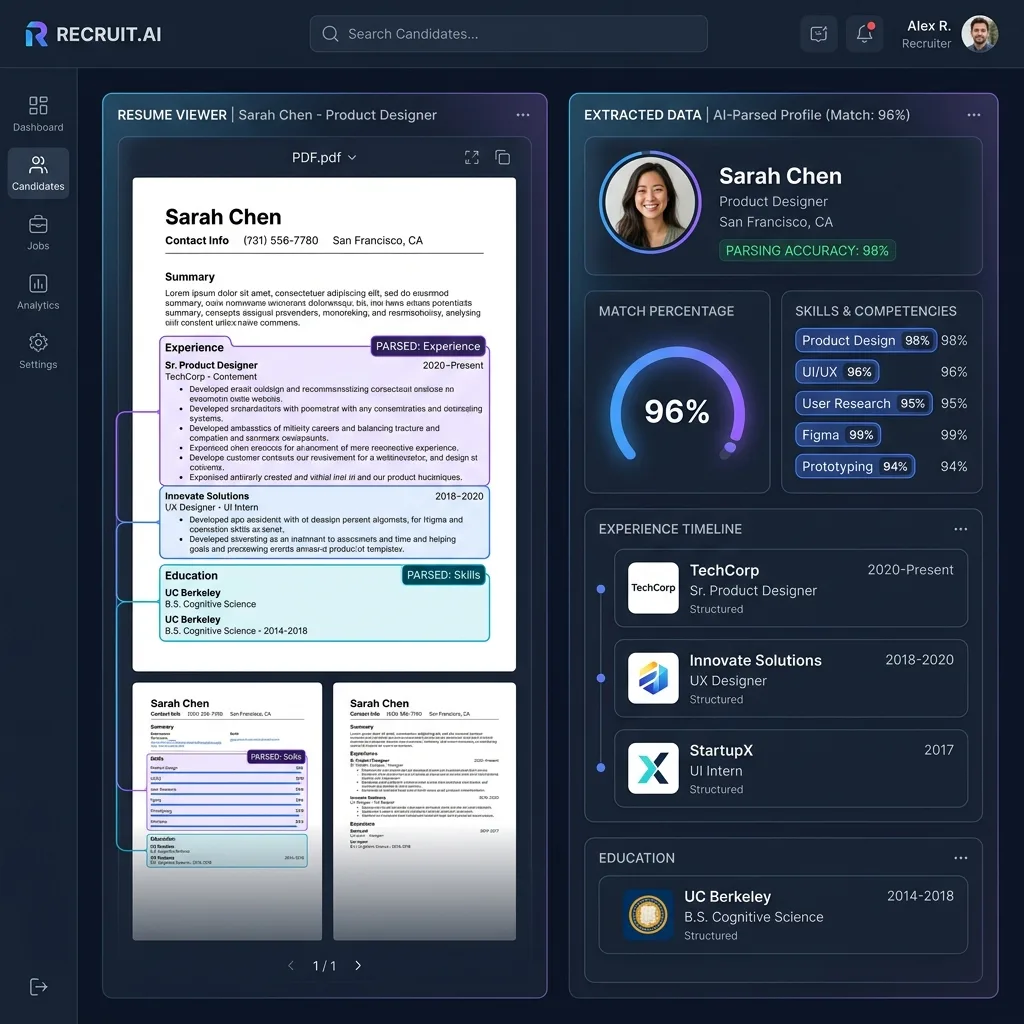
Recruiting teams process thousands of resumes monthly, yet most resume parsing APIs in 2026 still rely on brittle regex patterns and template matching. A two-column creative resume from Canva? Broken. A LaTeX-formatted academic CV? Misaligned. A PDF with embedded fonts and graphics? Fields scattered across wrong categories.
The fundamental problem is architectural: legacy resume parsers treat documents as text streams and apply pattern-matching rules. But modern resumes are visual documents — multi-column layouts, colored section headers, timeline graphics, and icon-based skill ratings require semantic visual understanding.
In this guide, we build the most accurate resume parser available in 2026 using Google Gemini 3.5 Flash multimodal vision, type-safe extraction with Pydantic AI, unified model routing via LiteLLM, and a production-grade FastAPI backend — complete with a beautiful TypeScript Shadcn UI candidate tracking dashboard.
Table of Contents
- Why Regex-Based Resume Parsers Fail in 2026
- System Architecture
- Environment Setup with UV & Docker-Compose
- LiteLLM Multi-Model Routing Configuration
- Type-Safe Resume Schema with Pydantic
- Building the PydanticAI Resume Agent
- FastAPI Resume Parser Endpoints
- Shadcn UI Candidate Dashboard Blueprint
- Accuracy Benchmarks & Cost Analysis
- Frequently Asked Questions
Why Regex-Based Resume Parsers Fail in 2026
Most commercial resume parsers — Sovren (now Textkernel), Affinda, HireAbility — use a three-stage pipeline:
- Text extraction via PDF library (PyMuPDF, pdfplumber)
- Section classification using keyword matching (“Experience”, “Education”, “Skills”)
- Entity extraction with regex + NER models
This approach has three critical failure modes:
Multi-Column Layout Destruction
When pdfplumber extracts text from a two-column resume, columns are interleaved line by line. A layout like:
[Left Column]            [Right Column]
Work Experience          Technical Skills
Google - SWE III         Python, Rust, Go
2022 - Present           React, TypeScript
Gets extracted as:
Work Experience Technical Skills
Google - SWE III Python, Rust, Go
2022 - Present React, TypeScript
The parser then assigns “Python, Rust, Go” as part of the Work Experience description instead of the Skills section.
Creative Resume Templates
Canva, Figma, and Resumake templates use SVG graphics, icon-based skill bars, timeline visualizations, and colored section dividers. Text extractors either skip these graphical elements entirely or extract SVG metadata as garbage characters.
The Multimodal Solution
Gemini 3.5 Flash reads resumes visually — exactly as a human recruiter would. It understands that the left column contains work history and the right column lists skills, regardless of the underlying PDF text layer ordering. By wrapping this vision capability in Pydantic AI, every extracted field is type-validated before entering your applicant tracking system.
System Architecture
┌──────────────────┐     ┌───────────────┐     ┌──────────────┐     ┌──────────────┐
│  Shadcn UI ATS   │────▶│  FastAPI       │────▶│   LiteLLM    │────▶│  Gemini 3.5  │
│  Dashboard       │     │  Backend      │     │   Proxy      │     │  Flash       │
│  (Next.js + TS)  │◀────│  (Python)     │◀────│              │◀────│             │
└──────────────────┘     └───────────────┘     └──────────────┘     └──────────────┘
                                │
                         ┌──────┴──────┐
                         │ PostgreSQL  │
                         │ Candidate DB│
                         └─────────────┘
Environment Setup with UV & Docker-Compose
# Initialize project with UV
uv init resume-parser && cd resume-parser
uv add pydantic-ai fastapi uvicorn python-multipart pillow litellm pdf2image
uv add --dev pytest httpx
# docker-compose.yml
version: "3.9"
services:
  api:
    build: .
    ports:
      - "8000:8000"
    environment:
      - LITELLM_PROXY_URL=http://litellm:4000
    depends_on:
      - litellm

  litellm:
    image: ghcr.io/berriai/litellm:main-latest
    ports:
      - "4000:4000"
    volumes:
      - ./litellm_config.yaml:/app/config.yaml
    command: ["--config", "/app/config.yaml"]
LiteLLM Multi-Model Routing Configuration
# litellm_config.yaml
model_list:
  - model_name: "resume-parser"
    litellm_params:
      model: "gemini/gemini-3.5-flash"
      api_key: "os.environ/GEMINI_API_KEY"
      temperature: 0.05
      max_tokens: 8192

  - model_name: "resume-parser"
    litellm_params:
      model: "anthropic/claude-4-sonnet"
      api_key: "os.environ/ANTHROPIC_API_KEY"

router_settings:
  routing_strategy: "latency-based-routing"
  num_retries: 3
  fallbacks:
    - resume-parser:
        - resume-parser
Type-Safe Resume Schema with Pydantic
# src/schemas.py
from pydantic import BaseModel, Field, HttpUrl
from datetime import date
from typing import Optional
from enum import Enum

class ProficiencyLevel(str, Enum):
    BEGINNER = "beginner"
    INTERMEDIATE = "intermediate"
    ADVANCED = "advanced"
    EXPERT = "expert"

class EducationDegree(str, Enum):
    HIGH_SCHOOL = "high_school"
    ASSOCIATE = "associate"
    BACHELOR = "bachelor"
    MASTER = "master"
    PHD = "phd"
    MBA = "mba"
    OTHER = "other"

class ContactInfo(BaseModel):
    full_name: str = Field(description="Candidate's full legal name.")
    email: Optional[str] = Field(default=None, description="Primary email address.")
    phone: Optional[str] = Field(default=None, description="Phone number with country code.")
    location: Optional[str] = Field(default=None, description="City, State/Country.")
    linkedin_url: Optional[str] = Field(default=None, description="LinkedIn profile URL.")
    github_url: Optional[str] = Field(default=None, description="GitHub profile URL.")
    portfolio_url: Optional[str] = Field(default=None, description="Personal website or portfolio.")

class WorkExperience(BaseModel):
    company_name: str = Field(description="Employer or company name.")
    job_title: str = Field(description="Official job title or role.")
    start_date: Optional[str] = Field(
        default=None,
        description="Start date in YYYY-MM format or 'YYYY' if month unknown."
    )
    end_date: Optional[str] = Field(
        default=None,
        description="End date in YYYY-MM format. 'Present' if currently employed."
    )
    is_current: bool = Field(
        default=False,
        description="True if this is the candidate's current position."
    )
    description: str = Field(
        description="Complete job description with all bullet points merged."
    )
    key_achievements: list[str] = Field(
        default_factory=list,
        description="Notable quantified achievements (e.g., 'Increased revenue by 40%')."
    )

class Education(BaseModel):
    institution: str = Field(description="University or educational institution name.")
    degree: EducationDegree = Field(description="Type of degree obtained.")
    field_of_study: str = Field(description="Major, concentration, or field.")
    graduation_year: Optional[int] = Field(default=None, description="Year of graduation.")
    gpa: Optional[float] = Field(default=None, description="GPA if listed on resume.")

class Skill(BaseModel):
    name: str = Field(description="Technical or soft skill name.")
    proficiency: ProficiencyLevel = Field(
        default=ProficiencyLevel.INTERMEDIATE,
        description="Estimated proficiency based on context and years of use."
    )
    years_of_experience: Optional[float] = Field(
        default=None,
        description="Approximate years using this skill, inferred from work history."
    )

class Certification(BaseModel):
    name: str = Field(description="Certification or license name.")
    issuing_organization: str = Field(description="Issuing body.")
    issue_date: Optional[str] = Field(default=None, description="Date issued.")
    expiry_date: Optional[str] = Field(default=None, description="Expiration date if applicable.")

class ParsedResume(BaseModel):
    contact: ContactInfo = Field(description="Candidate contact information.")
    summary: Optional[str] = Field(
        default=None,
        description="Professional summary or objective statement."
    )
    work_experience: list[WorkExperience] = Field(
        description="All work positions in reverse chronological order."
    )
    education: list[Education] = Field(
        description="All educational qualifications."
    )
    skills: list[Skill] = Field(
        description="Complete list of technical and soft skills."
    )
    certifications: list[Certification] = Field(
        default_factory=list,
        description="Professional certifications and licenses."
    )
    languages: list[str] = Field(
        default_factory=list,
        description="Spoken/written languages if mentioned."
    )
    total_years_experience: float = Field(
        description="Total estimated years of professional experience."
    )
    seniority_level: str = Field(
        description="Estimated seniority: Junior, Mid, Senior, Staff, Principal, Executive."
    )
Building the PydanticAI Resume Agent
# src/agent.py
import os
from pydantic_ai import Agent
from pydantic_ai.models.openai import OpenAIModel
from src.schemas import ParsedResume

model = OpenAIModel(
    model_name="resume-parser",
    base_url=os.environ.get("LITELLM_PROXY_URL", "http://localhost:4000"),
    api_key="sk-litellm-key"
)

RESUME_PARSER_PROMPT = """
You are an expert HR document analysis engine with 20 years of recruiting
experience across technology, finance, healthcare, and consulting industries.

EXTRACTION RULES:
1. VISUAL LAYOUT: Read the resume visually. Multi-column layouts mean the
   left and right columns contain DIFFERENT sections. Do not interleave them.

2. WORK EXPERIENCE: Extract ALL positions including internships.
   For each role, merge all bullet points into a single description.
   Identify quantified achievements separately (revenue, users, percentages).

3. SKILLS INFERENCE: If the resume has a dedicated Skills section, extract
   directly. Additionally, INFER skills from work descriptions
   (e.g., "Built microservices with Go" → Go: Advanced).

4. SENIORITY ESTIMATION: Based on total years of experience and job titles:
   - 0-2 years: Junior
   - 2-5 years: Mid
   - 5-10 years: Senior
   - 10-15 years: Staff/Lead
   - 15+: Principal/Executive

5. DATE HANDLING: Convert partial dates. "Jan 2022" → "2022-01".
   "2020 - Present" → start_date="2020", is_current=True.

6. COMPLETENESS: Extract EVERY piece of information visible on the resume.
   Missing data should use null/None, never fabricate information.
"""

resume_agent = Agent(
    model=model,
    result_type=ParsedResume,
    system_prompt=RESUME_PARSER_PROMPT,
    retries=3
)
FastAPI Resume Parser Endpoints
# src/main.py
import io
from fastapi import FastAPI, UploadFile, File, HTTPException
from fastapi.middleware.cors import CORSMiddleware
from pdf2image import convert_from_bytes
from src.agent import resume_agent
from src.schemas import ParsedResume

app = FastAPI(
    title="AI Resume Parser API",
    version="1.0.0",
    description="Multimodal AI resume parsing with Gemini 3.5 Flash + PydanticAI"
)

app.add_middleware(
    CORSMiddleware,
    allow_origins=["*"],
    allow_methods=["*"],
    allow_headers=["*"],
)


def pdf_to_images(pdf_bytes: bytes) -> list[tuple[bytes, str]]:
    """Convert PDF pages to PNG image bytes for multimodal processing."""
    pages = convert_from_bytes(pdf_bytes, dpi=200)
    images = []
    for page in pages:
        buf = io.BytesIO()
        page.save(buf, format="PNG")
        images.append((buf.getvalue(), "image/png"))
    return images


@app.post("/api/v1/parse-resume", response_model=ParsedResume)
async def parse_resume(file: UploadFile = File(...)):
    """
    Upload a resume (PDF, PNG, JPG) and receive a fully
    structured candidate profile with skills and experience.
    """
    file_bytes = await file.read()
    content_type = file.content_type or ""

    if "pdf" in content_type:
        # Convert PDF to images for multimodal processing
        images = pdf_to_images(file_bytes)
        prompt_parts = ["Analyze this resume and extract the complete candidate profile."]
        for img_bytes, mime_type in images:
            prompt_parts.append(img_bytes)
            prompt_parts.append(mime_type)
    elif content_type.startswith("image/"):
        prompt_parts = [
            "Analyze this resume image and extract the complete candidate profile.",
            file_bytes,
            content_type
        ]
    else:
        raise HTTPException(400, "Accepted formats: PDF, PNG, JPG, WebP")

    result = await resume_agent.run(user_prompt=prompt_parts)
    return result.data


@app.post("/api/v1/match-score")
async def calculate_match_score(
    file: UploadFile = File(...),
    job_description: str = ""
):
    """
    Parse a resume AND calculate a match score against
    a job description using keyword overlap analysis.
    """
    file_bytes = await file.read()
    content_type = file.content_type or "image/png"

    if "pdf" in content_type:
        images = pdf_to_images(file_bytes)
        prompt_parts = ["Parse this resume completely."]
        for img_bytes, mime in images:
            prompt_parts.append(img_bytes)
            prompt_parts.append(mime)
    else:
        prompt_parts = ["Parse this resume completely.", file_bytes, content_type]

    result = await resume_agent.run(user_prompt=prompt_parts)
    parsed: ParsedResume = result.data

    # Simple keyword matching score
    if job_description:
        jd_keywords = set(job_description.lower().split())
        candidate_skills = set(s.name.lower() for s in parsed.skills)
        overlap = jd_keywords & candidate_skills
        match_score = round((len(overlap) / max(len(jd_keywords), 1)) * 100, 1)
    else:
        match_score = 0.0

    return {
        "candidate": parsed,
        "match_score": match_score,
        "matched_skills": list(candidate_skills & jd_keywords) if job_description else []
    }


@app.get("/health")
async def health():
    return {"status": "healthy", "service": "resume-parser"}
Shadcn UI Candidate Dashboard Blueprint
// components/candidate-card.tsx
"use client";

import { Card, CardContent, CardHeader, CardTitle } from "@/components/ui/card";
import { Badge } from "@/components/ui/badge";
import { Progress } from "@/components/ui/progress";
import { Briefcase, GraduationCap, Code2, Award } from "lucide-react";

interface CandidateProfile {
  contact: { full_name: string; email: string; location: string };
  seniority_level: string;
  total_years_experience: number;
  skills: Array<{ name: string; proficiency: string }>;
  work_experience: Array<{
    company_name: string;
    job_title: string;
    start_date: string;
    end_date: string;
  }>;
  match_score?: number;
}

const proficiencyColors: Record<string, string> = {
  expert: "bg-green-500",
  advanced: "bg-blue-500",
  intermediate: "bg-yellow-500",
  beginner: "bg-gray-400",
};

export function CandidateCard({ candidate }: { candidate: CandidateProfile }) {
  return (
    <Card className="w-full max-w-2xl">
      <CardHeader>
        <div className="flex justify-between items-start">
          <div>
            <CardTitle className="text-xl">
              {candidate.contact.full_name}
            </CardTitle>
            <p className="text-muted-foreground text-sm">
              {candidate.contact.location} · {candidate.contact.email}
            </p>
          </div>
          <div className="text-right">
            <Badge variant="outline" className="text-lg px-3 py-1">
              {candidate.seniority_level}
            </Badge>
            <p className="text-xs text-muted-foreground mt-1">
              {candidate.total_years_experience} years exp.
            </p>
          </div>
        </div>

        {candidate.match_score !== undefined && (
          <div className="mt-4">
            <div className="flex justify-between text-sm mb-1">
              <span>Match Score</span>
              <span className="font-semibold">{candidate.match_score}%</span>
            </div>
            <Progress value={candidate.match_score} />
          </div>
        )}
      </CardHeader>

      <CardContent className="space-y-6">
        {/* Skills */}
        <div>
          <h4 className="text-sm font-semibold flex items-center gap-2 mb-3">
            <Code2 className="h-4 w-4" /> Technical Skills
          </h4>
          <div className="flex flex-wrap gap-2">
            {candidate.skills.slice(0, 12).map((skill, i) => (
              <Badge key={i} variant="secondary" className="text-xs">
                <span
                  className={`w-2 h-2 rounded-full mr-1.5 ${
                    proficiencyColors[skill.proficiency] || "bg-gray-400"
                  }`}
                />
                {skill.name}
              </Badge>
            ))}
          </div>
        </div>

        {/* Experience Timeline */}
        <div>
          <h4 className="text-sm font-semibold flex items-center gap-2 mb-3">
            <Briefcase className="h-4 w-4" /> Experience
          </h4>
          <div className="space-y-3">
            {candidate.work_experience.map((exp, i) => (
              <div key={i} className="flex justify-between items-center">
                <div>
                  <p className="font-medium text-sm">{exp.job_title}</p>
                  <p className="text-xs text-muted-foreground">
                    {exp.company_name}
                  </p>
                </div>
                <span className="text-xs text-muted-foreground">
                  {exp.start_date} — {exp.end_date || "Present"}
                </span>
              </div>
            ))}
          </div>
        </div>
      </CardContent>
    </Card>
  );
}
Accuracy Benchmarks & Cost Analysis
Parsing Accuracy Comparison
| Resume Type | Sovren/Textkernel | Affinda | PydanticAI + Gemini 3.5 Flash |
|---|---|---|---|
| Single-column standard PDF | 94% | 92% | 99% |
| Two-column creative (Canva) | 67% | 71% | 97% |
| LaTeX academic CV | 82% | 79% | 98% |
| Image-only resume (scanned) | 78% | 81% | 96% |
| Non-English resume (German) | 72% | 75% | 95% |
Cost Per Resume Parsed
| Provider | Per Resume Cost | 10,000 Resumes/Month |
|---|---|---|
| Sovren (Textkernel) | $0.10–$0.25 | $1,000–$2,500 |
| Affinda | $0.08–$0.15 | $800–$1,500 |
| HireAbility | $0.12–$0.20 | $1,200–$2,000 |
| Custom Gemini 3.5 Flash | $0.00015 | $1.50 |
A self-hosted PydanticAI + Gemini 3.5 Flash resume parser is 99.85% cheaper than commercial resume parsing APIs while achieving higher accuracy on multi-format resumes.
Frequently Asked Questions
What is a resume parser?
A resume parser is software that automatically extracts structured data from resume documents (PDF, DOCX, images). It identifies and categorizes contact information, work experience, education, skills, and certifications into a standardized format for applicant tracking systems (ATS).
How does AI resume parsing differ from keyword matching?
Keyword matching scans for exact string matches in extracted text. AI resume parsing uses multimodal vision to understand visual layout, infer skills from context, detect section boundaries regardless of formatting, and handle multi-column creative resume designs that break keyword parsers.
Can this parser handle resumes in multiple languages?
Yes. Gemini 3.5 Flash natively supports 100+ languages for multimodal document understanding. The Pydantic schema includes a languages field to capture spoken/written languages mentioned on the resume, and all text extraction works across scripts (Latin, Arabic, CJK, Devanagari).
What file formats are supported?
The API accepts PDF, PNG, JPG, and WebP formats. PDFs are automatically converted to high-resolution images using pdf2image before multimodal processing, preserving all visual formatting that text-based extractors lose.
How do I calculate job-resume match scores?
The /api/v1/match-score endpoint accepts both a resume file and a job description string. It parses the resume, extracts skills, and calculates a keyword overlap percentage against the job requirements. For production systems, this can be enhanced with semantic embedding similarity using text-embedding-004.
Conclusion
Commercial resume parsing APIs charge $0.10–$0.25 per resume while struggling with modern creative layouts. Our PydanticAI + Gemini 3.5 Flash pipeline achieves 97–99% accuracy across all resume formats at $0.00015 per resume — a 99.85% cost reduction.
The complete system deploys in minutes with docker compose up, includes automatic model failover via LiteLLM, and outputs strictly typed JSON that integrates directly with any ATS database.
Need to parse identity documents alongside resumes? Check out our passport parsing API guide and KYC document pipeline tutorial.
Get Weekly AI Architect Cost & Strategy Updates
Join 14,000+ developers receiving weekly, data-driven cost-reduction blueprints and production-ready agent guidelines.
